Background
A while ago, I got two LTO-6 tape drives for practically free (previous post here). Since then, I’ve been using them for archival storage of video files. I chose LTFS for its open format and independence of backup software, and I’ve been using it on my primary PC running Windows 10. To make sure I won’t run into the “shoe shining” problem, where the tape drive has to rewind many times when writing small files, I zip up my data into large files (generally >100GB) before putting them on tape. During the zipping process, I also write the zipped files to a quick HDD or a temporary RAID 0 array, so it can keep up with the writing speed of the tape drive. With robocopy, I was able to write to LTO-6 tapes at up to 150MB/s on average, which is pretty close to its specification of 160MB/s. One day, I had to restore a large file, and I noticed the read speed was ridiculously slow (in the realm of 8-10MB/s). What’s going on?
Troubleshooting Attempts
My troubleshooting began with searching this issue on Google for any clues that might have caused this. There weren’t many results, and Windows + LTFS didn’t seem a popular combination. Here are some links I found that might be relevant:
- The op in this Reddit post seems to have the same problem, although he/she seems to end up switching to a proprietary backup software instead of LTFS.
- The op in this Reddit post might have the same problem, and he/she ended up switching back to setting up a Windows 7 machine dedicated to tape backup.
- In this Reddit post, someone mentioned the slow speeds with LTFS, but no solutions were mentioned at the time of writing.
- This forum thread is pretty old (2012), and no real solution was mentioned at the time of writing.
- The op in this forum thread also ended up using LTFS in a Windows 7 environment.
- And lastly, this link talked about slow read speeds, but op was using LTFS in RedHat Linux.
At first, I thought this may have been caused by me using an improper tool (e.g. drag-and-drop using Windows File Explorer) to write those files to tape or maybe wrong settings when formatting the tape, resulting in file fragmentation. As the tape is a linear medium with enormous seek time, this would cause slow reading speeds from the constant seeking of data. However, as the tape was full and deleting files in LTFS won’t release the occupied space, I had to format the whole tape and write the files back using robocopy again. To my surprise, reading from the tape again still results in a slow speed, so what I thought wasn’t the actual problem.
During this slow reading, the tape drive was mostly silent, with the occasional spinning of the tape every now and then as data is copied. This makes me think it might be something software-related. Testing with the HPE Library & Tape Tools and Iperius backup software both showed full reading and writing speeds, confirming there were no issues with my hardware setup.
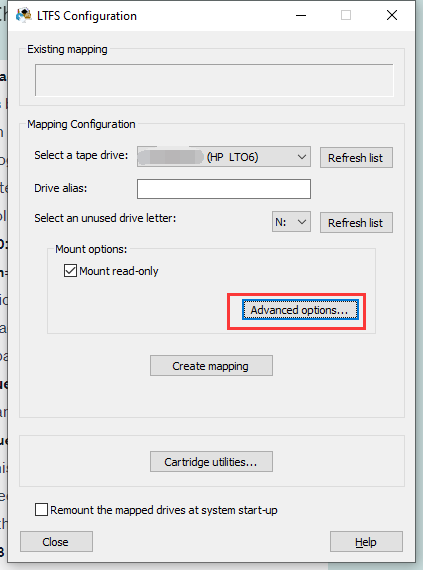
Next, I played around with various settings in the LTFS Configurator tool by HPE, and nothing helped. Then, I noticed the tool supports mounting the volume with verbose logging:
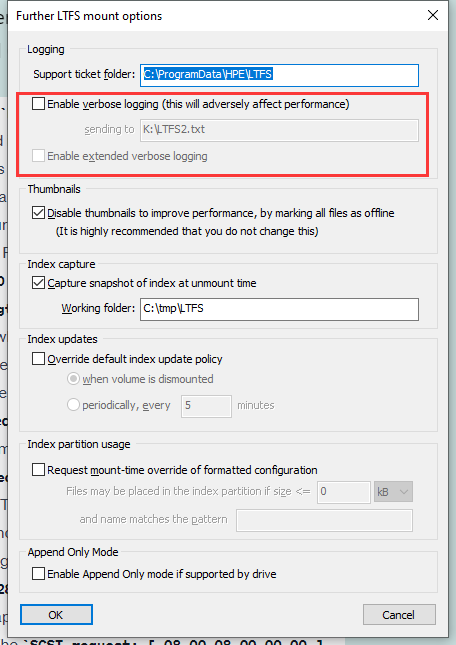
Enabling it gave me a detailed log, and here’s an excerpt of it when writing to the tape:
727ca0 LTFS20010D SCSI request: [ 0A 00 08 00 00 00 ] Requested length=524288
fgetattr[50720816] /MVI_0019-001.MP4
write[50720816] 524288 bytes to 295698432 flags: 0x2
   write[50720816] 524288 bytes to 295698432
fgetattr[50720816] /MVI_0019-001.MP4
write[50720816] 524288 bytes to 296222720 flags: 0x2
   write[50720816] 524288 bytes to 296222720
fgetattr[50720816] /MVI_0019-001.MP4
write[50720816] 524288 bytes to 296747008 flags: 0x2
   write[50720816] 524288 bytes to 296747008
fgetattr[50720816] /MVI_0019-001.MP4
write[50720816] 524288 bytes to 297271296 flags: 0x2
   write[50720816] 524288 bytes to 297271296
727ca0 LTFS20011D SCSI outcome: Driver status=0x00 SCSI status=0x00 Actual length=524288
727ca0 LTFS20039D Backend write: 524288 bytes
727ca0 LTFS20010D SCSI request: [ 0A 00 08 00 00 00 ] Requested length=524288
fgetattr[50720816] /MVI_0019-001.MP4
write[50720816] 524288 bytes to 297795584 flags: 0x2
   write[50720816] 524288 bytes to 297795584
fgetattr[50720816] /MVI_0019-001.MP4
write[50720816] 524288 bytes to 298319872 flags: 0x2
   write[50720816] 524288 bytes to 298319872
fgetattr[50720816] /MVI_0019-001.MP4
write[50720816] 524288 bytes to 298844160 flags: 0x2
   write[50720816] 524288 bytes to 298844160
fgetattr[50720816] /MVI_0019-001.MP4
write[50720816] 524288 bytes to 299368448 flags: 0x2
727ca0 LTFS20011D SCSI outcome: Driver status=0x00 SCSI status=0x00 Actual length=524288
   write[50720816] 524288 bytes to 299368448
727ca0 LTFS20039D Backend write: 524288 bytes
727ca0 LTFS20010D SCSI request: [ 0A 00 08 00 00 00 ] Requested length=524288
And here’s a log excerpt during a read operation:
305ec20 LTFS20011D SCSI outcome: Driver status=0x00 SCSI status=0x00 Actual length=524288
   read[50721040] 524288 bytes from 780140544
e71900 LTFS20057D Backend locate: (1, 1497)
e71900 LTFS20010D SCSI request: [ 92 00 00 01 00 00 00 00 00 00 05 D9 00 00 00 00 ] Requested length=0
read[50721040] 524288 bytes from 780664832 flags: 0x2
e71900 LTFS20011D SCSI outcome: Driver status=0x00 SCSI status=0x00 Actual length=0
e71900 LTFS20010D SCSI request: [ 34 06 00 00 00 00 00 00 00 00 ] Requested length=32
e71900 LTFS20011D SCSI outcome: Driver status=0x00 SCSI status=0x00 Actual length=32
e71900 LTFS20060D Backend ReadPosition: Partition=1, LogObject=1497, FMcount=4
e71900 LTFS20039D Backend read: 524288 bytes
e71900 LTFS20010D SCSI request: [ 08 00 08 00 00 00 ] Requested length=524288
e71900 LTFS20011D SCSI outcome: Driver status=0x00 SCSI status=0x00 Actual length=524288
   read[50721040] 524288 bytes from 781189120
e70a60 LTFS20057D Backend locate: (1, 1499)
e70a60 LTFS20010D SCSI request: [ 92 00 00 01 00 00 00 00 00 00 05 DB 00 00 00 00 ] Requested length=0
read[50721040] 524288 bytes from 781713408 flags: 0x2
e70a60 LTFS20011D SCSI outcome: Driver status=0x00 SCSI status=0x00 Actual length=0
e70a60 LTFS20010D SCSI request: [ 34 06 00 00 00 00 00 00 00 00 ] Requested length=32
e70a60 LTFS20011D SCSI outcome: Driver status=0x00 SCSI status=0x00 Actual length=32
e70a60 LTFS20060D Backend ReadPosition: Partition=1, LogObject=1499, FMcount=4
e70a60 LTFS20039D Backend read: 524288 bytes
e70a60 LTFS20010D SCSI request: [ 08 00 08 00 00 00 ] Requested length=524288
e70a60 LTFS20011D SCSI outcome: Driver status=0x00 SCSI status=0x00 Actual length=524288
   read[50721040] 524288 bytes from 782237696
e70c00 LTFS20057D Backend locate: (1, 1496)
e70c00 LTFS20010D SCSI request: [ 92 00 00 01 00 00 00 00 00 00 05 D8 00 00 00 00 ] Requested length=0
read[50721040] 524288 bytes from 782761984 flags: 0x2
e70c00 LTFS20011D SCSI outcome: Driver status=0x00 SCSI status=0x00 Actual length=0
e70c00 LTFS20010D SCSI request: [ 34 06 00 00 00 00 00 00 00 00 ] Requested length=32
e70c00 LTFS20011D SCSI outcome: Driver status=0x00 SCSI status=0x00 Actual length=32
e70c00 LTFS20060D Backend ReadPosition: Partition=1, LogObject=1496, FMcount=4
e70c00 LTFS20039D Backend read: 524288 bytes
e70c00 LTFS20010D SCSI request: [ 08 00 08 00 00 00 ] Requested length=524288
e70c00 LTFS20011D SCSI outcome: Driver status=0x00 SCSI status=0x00 Actual length=524288
   read[50721040] 524288 bytes from 780664832
e70da0 LTFS20057D Backend locate: (1, 1498)
e70da0 LTFS20010D SCSI request: [ 92 00 00 01 00 00 00 00 00 00 05 DA 00 00 00 00 ] Requested length=0
read[50721040] 524288 bytes from 783286272 flags: 0x2
e70da0 LTFS20011D SCSI outcome: Driver status=0x00 SCSI status=0x00 Actual length=0
e70da0 LTFS20010D SCSI request: [ 34 06 00 00 00 00 00 00 00 00 ] Requested length=32
e70da0 LTFS20011D SCSI outcome: Driver status=0x00 SCSI status=0x00 Actual length=32
e70da0 LTFS20060D Backend ReadPosition: Partition=1, LogObject=1498, FMcount=4
e70da0 LTFS20039D Backend read: 524288 bytes
e70da0 LTFS20010D SCSI request: [ 08 00 08 00 00 00 ] Requested length=524288
e70da0 LTFS20011D SCSI outcome: Driver status=0x00 SCSI status=0x00 Actual length=524288
   read[50721040] 524288 bytes from 781713408
e715c0 LTFS20057D Backend locate: (1, 1500)
e715c0 LTFS20010D SCSI request: [ 92 00 00 01 00 00 00 00 00 00 05 DC 00 00 00 00 ] Requested length=0
read[50721040] 524288 bytes from 784334848 flags: 0x2
e715c0 LTFS20011D SCSI outcome: Driver status=0x00 SCSI status=0x00 Actual length=0
e715c0 LTFS20010D SCSI request: [ 34 06 00 00 00 00 00 00 00 00 ] Requested length=32
e715c0 LTFS20011D SCSI outcome: Driver status=0x00 SCSI status=0x00 Actual length=32
e715c0 LTFS20060D Backend ReadPosition: Partition=1, LogObject=1500, FMcount=4
e715c0 LTFS20039D Backend read: 524288 bytes
e715c0 LTFS20010D SCSI request: [ 08 00 08 00 00 00 ] Requested length=524288
e715c0 LTFS20011D SCSI outcome: Driver status=0x00 SCSI status=0x00 Actual length=524288
Just by looking at the logs without any knowledge of SCSI commands, I noticed there were a lot more small transfers when reading from the tape compared to when the tape is being written. When writing to the tape, it seems to write blocks sized 512KB one after another, without interruption. To get more information about what’s happening, I asked ChatGPT (GPT-4 model) to interpret the reading logs:
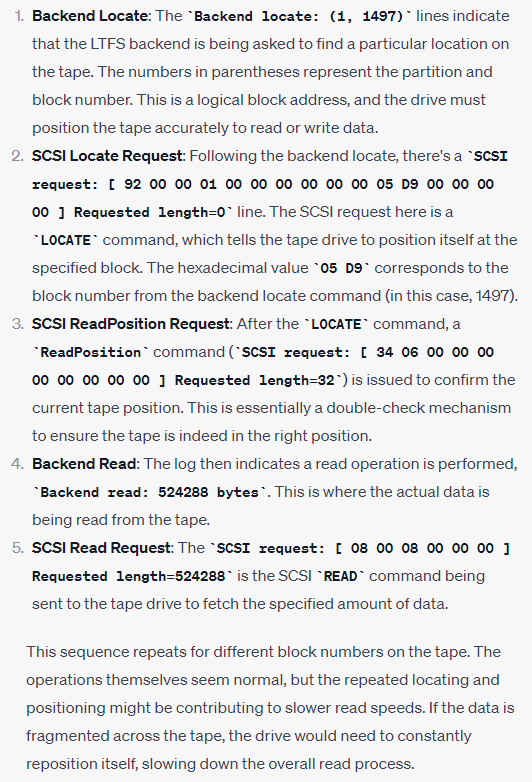
This confirmed my guess that the software was trying to read from different locations rather than sequentially. Of course, LLM like ChatGPT may produce false information that looks plausible, so I took another step to verify this myself: a simple Python script that reads a file, block by block, until the end of the file:
file_in = "src_file_on_tape"
file_out = "dest_file_on_hdd"

BLOCK_SIZE = 524288

with open(file_in, 'rb') as f_in:
	with open(file_out, 'wb') as f_out:
		while True:
			buf_bytes = f_in.read(BLOCK_SIZE)
			f_out.write(buf_bytes)
			if len(buf_bytes) < BLOCK_SIZE:
				break
With this, I could see a full 100MB+/s transfer speed writing to the destination hard drive! This basically confirms the copying tool was causing this slow restoration of files from tape.
I also tried the ltfscopy utility from HPE, which is supposed to handle reading from the tape linearly. Strangely, it also has the same problem. Maybe it used some Windows copy API that changed behaviour since Windows 10?
The Solution
Once I had figured out what was wrong, I tried to look for an alternative copy tool that fits my requirements. However, even with help from ChatGPT, I couldn’t seem to find any options that are guaranteed to read data linearly. I then asked ChatGPT again to iterate on my initial Python script with my feedback. After a few iterations, I arrived at this script that worked well enough:
import os
import time
import glob
import argparse


BLOCK_SIZE = 524288  # Size of blocks to read and write
PRINT_THRESHOLD = 100 * 1024 * 1024  # Print every 100MB

# Argument parser
parser = argparse.ArgumentParser(description='Copy files matching a pattern from one directory to another.')
parser.add_argument('source_dir', help='Source directory')
parser.add_argument('dest_dir', help='Destination directory')
parser.add_argument('pattern', help='Pattern to match files')
args = parser.parse_args()

# Get list of files to copy
files_to_copy = glob.glob(os.path.join(args.source_dir, args.pattern))


for file_in in files_to_copy:
    file_out = os.path.join(args.dest_dir, os.path.basename(file_in))

    # Get total file size
    total_size = os.path.getsize(file_in)

    with open(file_in, 'rb') as f_in:
        with open(file_out, 'wb') as f_out:
            bytes_copied = 0  # Keep track of bytes copied
            start_time = time.time()  # Start time for speed calculations
            print_counter = 0  # Counter to control when to print
            last_print_time = start_time  # Time of last print for speed calculations

            while True:
                buf_bytes = f_in.read(BLOCK_SIZE)
                f_out.write(buf_bytes)
                bytes_copied += len(buf_bytes)
                print_counter += len(buf_bytes)

                if print_counter >= PRINT_THRESHOLD:
                    # Calculate speed
                    current_time = time.time()
                    elapsed_time = current_time - last_print_time
                    speed = PRINT_THRESHOLD / elapsed_time / (1024*1024)  # Speed in MB/s

                    # Calculate progress
                    progress = bytes_copied / total_size * 100

                    print(f"File: {os.path.basename(file_in)}, Copied: {bytes_copied} bytes, Speed: {speed:.2f} MB/s, Progress: {progress:.2f}%\r")

                    # Reset print_counter and last_print_time
                    print_counter = 0
                    last_print_time = current_time

                if len(buf_bytes) < BLOCK_SIZE:
                    break

    print(f"Copy {os.path.basename(file_in)} complete.")
    print("Average speed: {:.2f} MB/s".format(total_size / (time.time() - start_time) / (1024*1024)))
This script doesn’t require any extra libraries or modules. It would simply copy files matching a pattern (specified as a command-line argument) sequentially from one location to another. During copying, for each 100MB of a file, it’ll display how much has been copied, what’s the average speed, and the current progress. This works well with my use case, which only sees a few large (100GB+) zipped-up files.
Conclusion
Well, there you have it! I hope this can help someone else facing the same problem. One day, if I have the time and motivation, I might put this on GitHub with binary executables to make it more accessible, although maybe at some point in the future, the developers for ltfscopy tools will address this problem.